The Two Types of Minecraft Templates Explained
When players search for a Minecraft template they are usually looking for one of two completely different things, and it is worth being precise about which one you need before you start hunting.
In-game smithing templates are physical items that exist inside your Minecraft world. You find them in specific loot chests, use them at a smithing table to upgrade or decorate equipment, and can duplicate them with diamonds and the right crafting block. The netherite upgrade smithing template is the most searched because without it you cannot turn any diamond gear into netherite gear in Java Edition 1.20 and later.
Skin templates are external image files used outside the game to design a custom player appearance. They are blank or pre-drawn 64x64 pixel PNGs that you edit in an image editor and then upload to your Minecraft account. These have no in-game item equivalent and are entirely separate from smithing templates.
- Smithing template: in-game item found in loot chests, used at a smithing table
- Netherite upgrade smithing template: the specific template required to upgrade diamond tools and armor to netherite
- Armor trim smithing template: used to apply decorative patterns to any armor piece using any metal material for color
- Minecraft skin template: a 64x64 pixel PNG file you edit externally and upload to your account
- Minecraft circle template: a pixel-grid reference chart used when building circular or spherical structures
How to Find the Netherite Upgrade Smithing Template
The netherite upgrade smithing template is found exclusively in Bastion Remnants, specifically in the treasure room chest. Bastion Remnants are large fortified structures that generate in all Nether biomes except the Basalt Deltas. Not all Bastion Remnants are identical: they come in four variants (Hoglin Stable, Housing Unit, Bridge, and Treasure Room), and only the Treasure Room variant guarantees a chest with a very high probability of containing the netherite upgrade template.
When you enter a Bastion, look for the central gold block structure that is heavily guarded by Piglins and Piglin Brutes. The treasure room is the most defended area in the structure. The chest in that room has approximately a 42% chance of containing a netherite upgrade smithing template, but since you often find 2 to 3 chests in and around the treasure room, your odds per Bastion visit are high. Once you have one template, duplication is straightforward and far more efficient than raiding multiple Bastions.
- Location: Bastion Remnant treasure room chests only (not regular Bastion chests)
- Nether biomes: Bastions spawn in Nether Wastes, Crimson Forest, Warped Forest, and Soul Sand Valley (not in Basalt Deltas)
- Drop chance: roughly 42% per treasure chest; most treasure rooms have 2-3 chests
- Bring gold armor: wearing any piece of gold armor prevents Piglins from immediately aggressing
- Watch for Piglin Brutes: they attack regardless of gold armor and hit hard; have a plan before entering
How to Duplicate a Smithing Template
Every smithing template in the game can be duplicated using the crafting table. This is essential for the netherite upgrade template because you need one per piece of equipment you want to upgrade, and raiding Bastions repeatedly is both time-consuming and resource-intensive.
The duplication recipe is: 7 diamonds arranged in a U shape (filling all slots except center top and center), your smithing template in the center top slot, and a specific block material in the center slot. The required block material is different for each template type and matches the biome or structure where the template is found. For the netherite upgrade template the required block is netherrack.
- Open a crafting table (3x3 grid).
- Place 7 diamonds filling the left column (3), bottom row center, and right column (3), leaving the center and top-center slots empty.
- Place your smithing template in the top-center slot.
- Place the required block material in the center slot. For netherite upgrade: netherrack. For Ward and Silence trims: cobbled deepslate. For Tide trim: prismarine. Check the table in the template section above for each trim's required material.
- Collect 2 smithing templates from the output. You have doubled your supply using 7 diamonds and 1 matching block.
Where to Find Every Armor Trim Smithing Template
Armor trim smithing templates are purely cosmetic: they apply a decorative pattern to your armor without changing its stats. You can use any metal ingot or gem as the color material (iron, gold, copper, netherite, emerald, redstone, amethyst, lapis, quartz, diamond) to get different color combinations on the same pattern.
Each armor trim template is tied to a specific structure in the game. The table in the template section above lists all 19 templates and their sources. The rarest are the Silence trim (Ancient City, extremely low drop rate), the Wayfinder, Raiser, Shaper, and Host trims (all from Trail Ruins suspicious gravel with a brush, with low individual chances), and the Tide trim (dropped by Elder Guardians rather than found in a chest).
- Easiest to obtain: Coast (Shipwreck), Dune (Desert Temple), Sentry (Pillager Outpost), Rib (Nether Fortress), all common structures
- Mid-difficulty: Eye (Stronghold), Ward (Ancient City regular chests), Snout (Bastion non-treasure chests)
- Hardest to obtain: Silence (Ancient City, very rare chest loot), Tide (Elder Guardian drop, not a chest), Wayfinder/Raiser/Shaper/Host (require brushing suspicious gravel in Trail Ruins)
- All trims can be duplicated once found using the crafting recipe above with the appropriate matching block material
Minecraft Skin Templates: Creating a Custom Player Skin
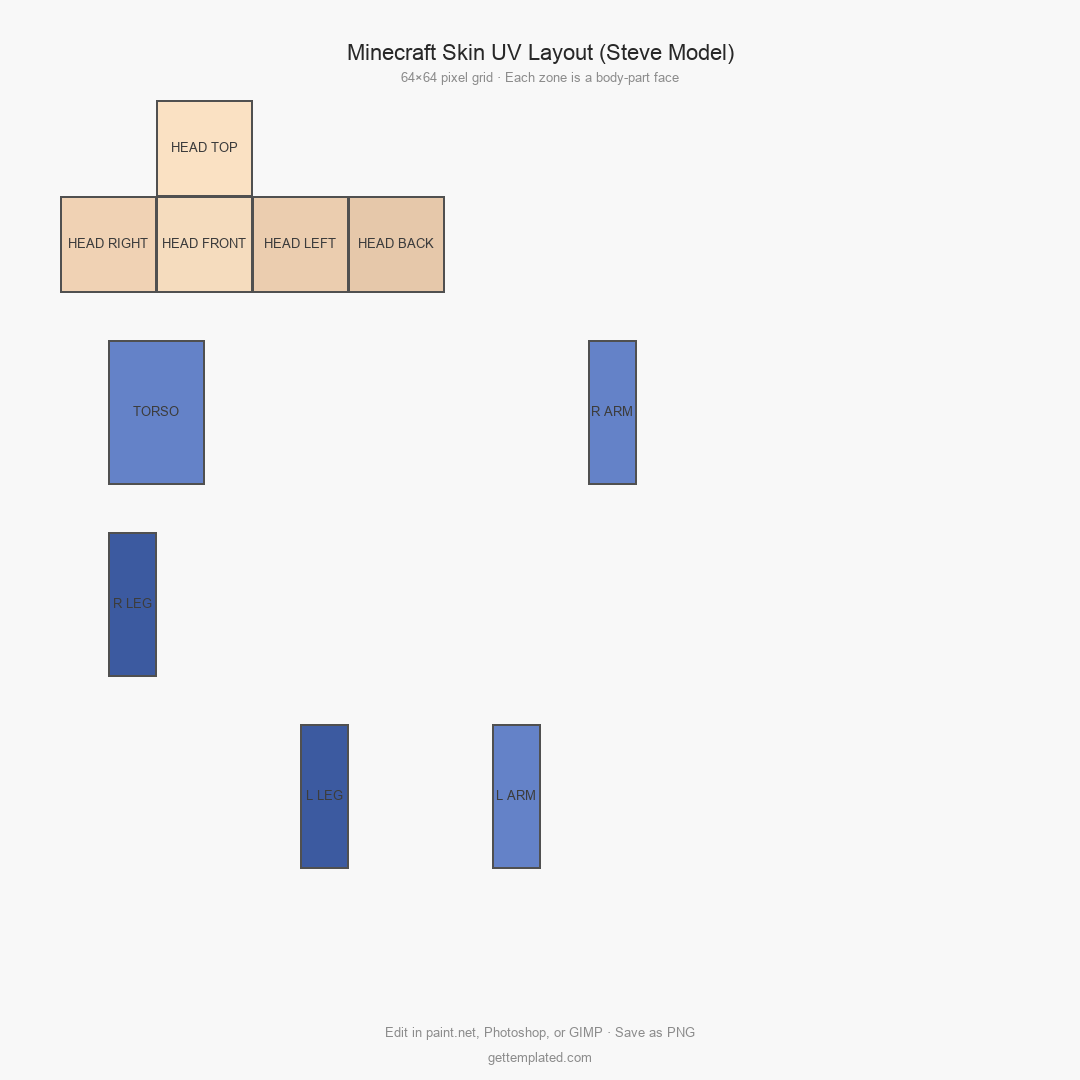
A Minecraft skin template is a blank 64x64 pixel PNG laid out in the standard player model mapping. The image is divided into sections that correspond to each body part: head, torso, arms, and legs, each with an inner layer (the base skin) and an outer layer (used for hair, clothing details, or accessories).
You do not need to draw entirely from scratch. Dozens of free skin editors online (Nova Skin, Skindex, MinecraftSkins.com) let you start from a template and paint on the model in real time with an instant 3D preview. If you prefer working in an image editor like Photoshop or GIMP, download a blank skin template PNG, paint your design using the body-part coordinate guide in the template section above, and export as 64x64 PNG. Upload the finished file at minecraft.net under your profile settings, or through the Minecraft Launcher on the Skins tab.
- Skin dimensions: exactly 64x64 pixels, PNG format with transparency support for the outer layer
- Two layers per body part: inner layer (the actual skin texture) and outer layer (clothing, hair, accessories on top)
- Face area is the most visible region at normal gameplay distance; prioritize detail there
- Transparent pixels in the outer layer reveal the inner layer beneath, allowing layered clothing effects
- Java Edition and Bedrock Edition use the same 64x64 format, but Bedrock has a slightly different arm width option (Alex vs. Steve model) that you set at upload
Minecraft Circle Templates for Building
A Minecraft circle template is not an in-game item. It is a pixel-grid reference chart that builders use when constructing circular or spherical structures in a block-based world where there are no true curves. Because every block is a 1x1 unit cube, a circle in Minecraft is actually a stepped approximation, and the larger the circle, the more steps are needed to keep it looking round.
Circle templates come in standard sizes (radius 5, 10, 20, 50 blocks, etc.) and show exactly which blocks to place at each X/Z coordinate to produce the most accurate circle possible at that diameter. Search for a Minecraft circle generator or Minecraft circle chart online to get a printable reference for any radius. When building spheres, repeat the circle pattern at each Y-level height using progressively smaller circles as you move toward the top and bottom of the sphere.
- A Minecraft circle is a block-by-block approximation of a true circle, not a geometric perfect circle
- Use a circle generator tool (search online for Minecraft circle generator) to get the exact block layout for any diameter
- For a sphere: build a vertical cross-section circle first, then fill in each horizontal layer using appropriately sized circles for that height
- Odd-number diameters produce circles with a single center block; even diameters produce a 2x2 center gap
- Larger circles look rounder because the steps between straight segments are smaller relative to the total circumference
The template