What Birthday Templates Are and Who Needs Them
A birthday template is a pre-formatted document that handles the layout and structure of birthday-related materials so you only need to fill in the specific details. The category covers several distinct document types that together support birthday planning and celebration.
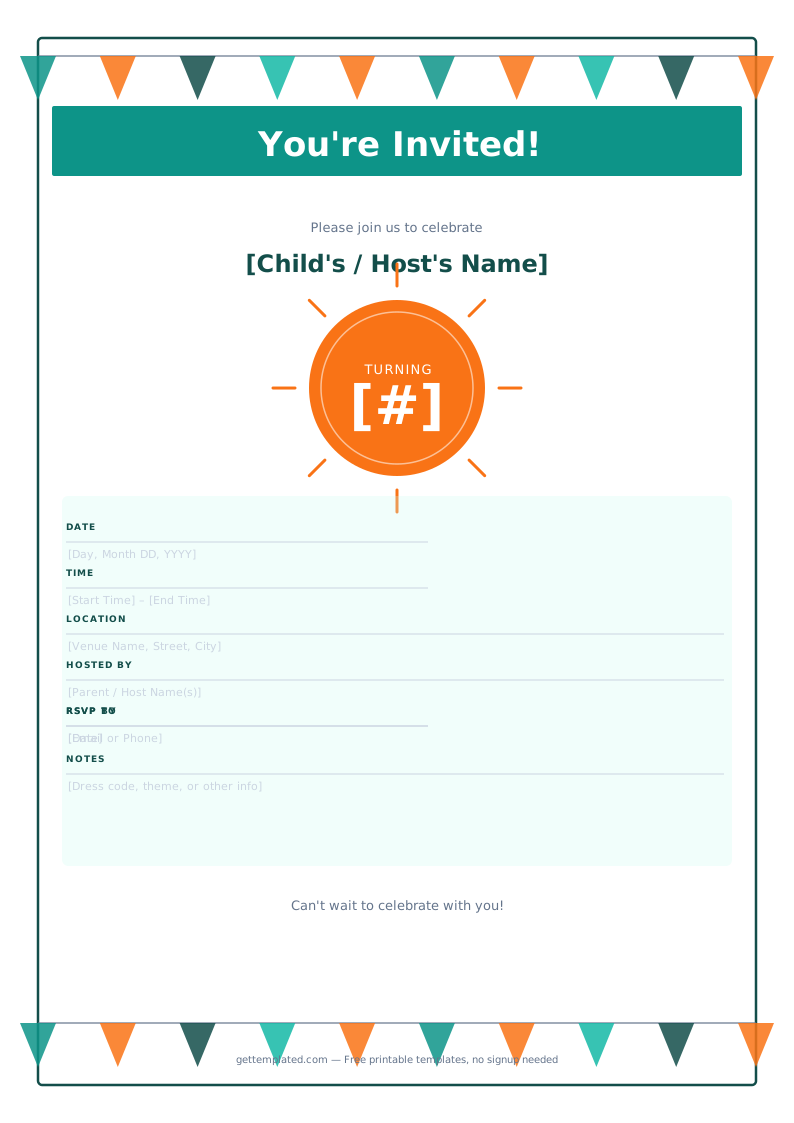
Birthday invite templates are the most common type. They provide the structure for a party invitation: who, when, where, and RSVP instructions. A good invitation template ensures nothing important is left out and saves time over designing a custom layout for every party.
Birthday card templates give you a ready-made message structure for a written card, whether for a coworker, a family member, or a child's friend. You can copy the message text directly or adapt it with specific personal details.
Birthday list templates help you track guest lists alongside gift preferences, dietary restrictions, and contact information for RSVP follow-up. They are especially useful for larger parties where the host needs to coordinate catering numbers or seating.
Parents planning children's birthday parties, office managers organizing workplace birthday cards, and adults planning milestone events like 30th or 50th birthdays all benefit from having a template to start from rather than a blank page.
What to Include in a Birthday Invite Template
A complete birthday invitation covers all the practical information a guest needs to attend. Missing any of these elements generates follow-up questions and confusion.
- Birthday person's name and the age or milestone being celebrated
- Date and day of week (guests check both to avoid calendar mistakes)
- Start time and ideally an end time
- Full venue address including city and zip code
- Host name and RSVP contact (phone or email)
- RSVP deadline (usually one to two weeks before the party)
- Theme or dress code if the party has one
- Any dietary or accessibility notes for guests with special needs
- Parking instructions or public transit directions if the venue is hard to find
- Gift preferences if the host has them (registry link, no gifts, donation preference)
How to Use a Birthday Template Step by Step
Getting a birthday invitation or card ready to send takes just a few steps with a template in hand.
- Choose the type of birthday template you need: invitation, card, or guest list. Each serves a different purpose, and you may need more than one for a larger party.
- Open the template in Google Docs, Word, or as a printable PDF depending on whether you plan to send it digitally or print it.
- Fill in the birthday person's name and the specific age or milestone. For milestone birthdays (18, 21, 30, 50), add a brief personal note or tagline that reflects the occasion.
- Enter the party details: date, time, location, and RSVP contact. Double-check the address by copying it directly from Google Maps to avoid typos.
- Customize the tone if needed. A children's party invitation should be playful and simple. A formal adult milestone party invitation should use a more polished tone.
- Add any theme details, dress code instructions, or special notes. Keep this section short: one to two lines is enough.
- Send digitally via email or messaging app, or print on cardstock for physical invitations. For printed invitations, print one test copy first to check margins and readability.
Birthday Card Template: Writing a Message That Feels Personal
A birthday card template gives you a solid structure, but the best cards feel specific to the person. Here are common card message frameworks and what makes each work.
- Warm and personal: "Happy birthday, [Name]. Watching you [specific achievement or quality] this year has been genuinely wonderful. Wishing you a year as [adjective] as you are."
- Funny and light: "Another year older, but you somehow keep looking the same. Happy birthday, [Name]. Here's to you."
- Professional (workplace): "Happy birthday, [Name]. Your [specific contribution] makes a real difference to this team. Enjoy your day."
- For a child: "Happy [AGE]th birthday! You are [adjective] and so fun. Hope your day is full of [their favorite thing]."
- Milestone (30, 40, 50): "[Name], you've built something real in [X] years. Happy birthday and here's to everything still ahead."
Birthday Invitation Tips and Common Mistakes
A birthday invitation sets the tone and expectation for the party. These practical tips help ensure guests show up prepared and on time.
- Send invitations two to three weeks in advance for casual parties, four to six weeks for large or destination events.
- Always include an RSVP deadline. Without one, many guests never confirm and you cannot accurately plan catering or seating.
- Include the end time. Guests with children or other commitments plan their day around both arrival and departure times.
- Keep the text short and scannable. An invitation should be read in under 30 seconds. Long paragraphs get skimmed and key details get missed.
- Use a font size of at least 11pt for printed invitations. Smaller text is hard to read and easy to miss at a glance.
- For children's parties, specify if siblings are invited or if it is a class-only event. This avoids awkward assumptions.
- For free birthday invite templates, resist the urge to add too many colors or fonts. A clean two-color design with one readable font looks more polished than a crowded design.
The template